
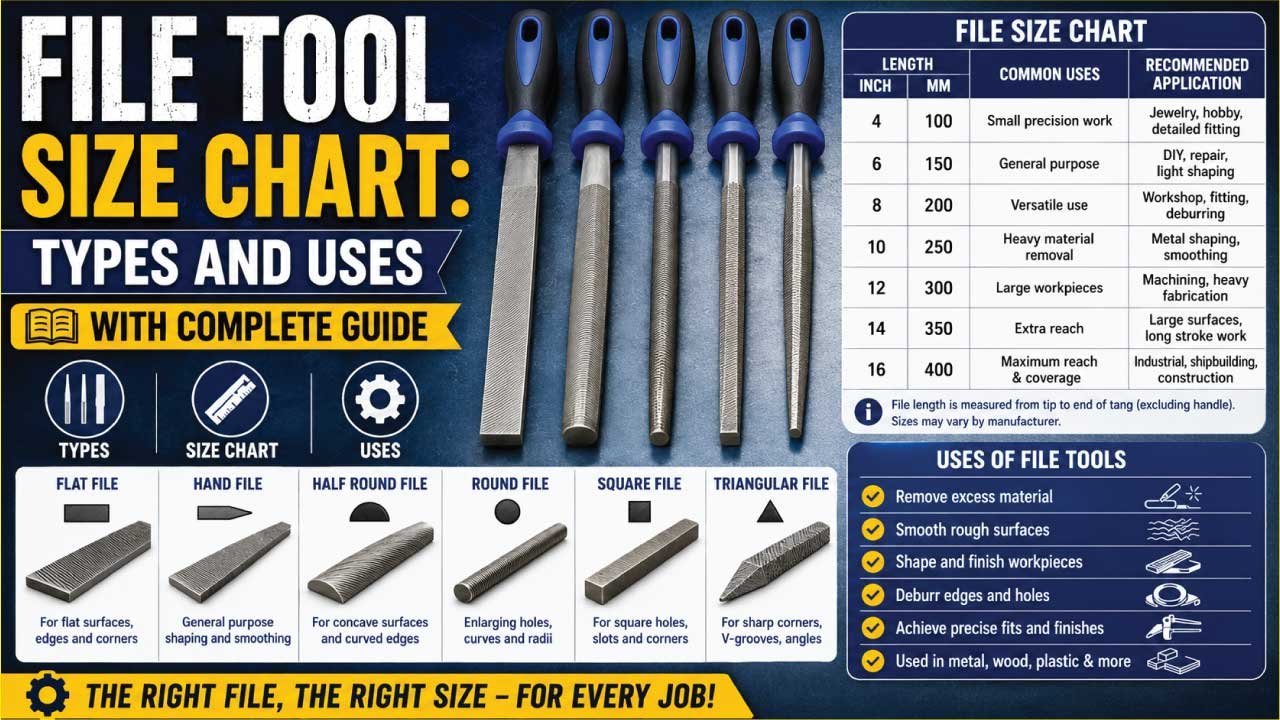
A file tool is one of the most important hand tools used in metalworking, woodworking, machining, fabrication, and maintenance work. Files are designed to remove small amounts of material, smooth rough surfaces, shape edges, and improve the finish of a workpiece.
Choosing the correct file size is essential for achieving accurate results, improving efficiency, and extending tool life. Different file lengths, shapes, and tooth patterns are designed for specific applications.
In this complete file tool size chart guide, you will learn standard file sizes, types, tooth cuts, materials, applications, and how to select the right file for your project.
What Is a File Tool?
A file tool is a hardened steel hand tool designed with sharp, angled cutting teeth on its surface. It works by removing small amounts of material through a controlled rubbing or pushing motion against a workpiece. This gradual cutting action allows for precise shaping, smoothing, and finishing of different materials.
Files are widely used in workshops, manufacturing, and repair work because they offer accuracy and control that power tools may not provide in fine-detail tasks. They come in various shapes, sizes, and tooth patterns depending on the type of material and finishing required.
Files are commonly used for:
- Smoothing rough edges
- Deburring metal parts
- Shaping materials
- Sharpening tools
- Finishing wood surfaces
- Fitting machine components
- Precision metalworking
- Maintenance and repair work
Files can be used on metal, wood, plastic, and other materials depending on the tooth design and hardness of the file, making them one of the most versatile hand tools in mechanical and workshop applications.
Standard File Tool Size Chart
The length of a file is measured from the heel to the tip, excluding the handle.
| File Size | Length (mm) | Length (Inches) | Common Applications |
|---|---|---|---|
| 100 mm | 4″ | 4 Inch | Small precision work |
| 150 mm | 6″ | 6 Inch | General-purpose filing |
| 200 mm | 8″ | 8 Inch | Workshop tasks |
| 250 mm | 10″ | 10 Inch | Metal fabrication |
| 300 mm | 12″ | 12 Inch | Heavy-duty shaping |
| 350 mm | 14″ | 14 Inch | Large workpieces |
| 400 mm | 16″ | 16 Inch | Industrial applications |
| 450 mm | 18″ | 18 Inch | Heavy material removal |
File Length Selection Chart
Choosing the correct file length depends on the workpiece size.
| Workpiece Size | Recommended File Length |
|---|---|
| Small Parts | 4″–6″ |
| Medium Components | 6″–10″ |
| Large Metal Parts | 10″–14″ |
| Structural Fabrication | 12″–18″ |
Longer files generally remove material faster and provide smoother results.
Common File Shapes
Files are produced in a variety of shapes to suit different working surfaces, cutting requirements, and precision levels. Each shape is designed for a specific type of material removal, allowing users to perform tasks such as smoothing, shaping, sharpening, and finishing with greater accuracy. Choosing the correct file shape improves efficiency and ensures better control during work.
1. Flat File
Flat files are the most commonly used type of file in workshops and general metalworking tasks. They feature a rectangular cross-section that provides a wide filing surface for quick and even material removal. Their simple design makes them highly versatile for many applications.
Features:
- Rectangular cross-section
- Wide filing surface
- Versatile design
Applications:
- General metalworking
- Surface finishing
- Deburring
2. Round File
Round files, also known as rat-tail files, have a circular cross-section that allows them to work effectively in curved or cylindrical spaces. They are especially useful for enlarging and smoothing internal holes and rounded surfaces.
Applications:
- Enlarging holes
- Filing curved surfaces
- Smoothing internal diameters
3. Half-Round File
Half-round files combine a flat surface on one side and a curved surface on the other. This dual design makes them highly versatile for both flat and contoured work, reducing the need for multiple tools.
Advantages:
- Multi-purpose use
- Suitable for flat and curved work
Applications:
- General fabrication
- Machine repair
- Toolmaking
4. Square File
Square files have four equal sides and are designed for working on square or rectangular openings. They are ideal for enlarging slots and shaping internal corners with precision.
Applications:
- Enlarging square openings
- Keyways
- Internal corners
5. Triangular File
Triangular files, also known as three-square files, have a three-sided shape that allows them to work efficiently in sharp angles and tight corners. They are commonly used in sharpening and detailed finishing tasks.
Applications:
- Sharpening saw teeth
- Filing corners
- Angle work
6. Knife File
Knife files feature a thin, wedge-shaped profile that tapers to a fine edge. This design makes them ideal for precision work where access to narrow spaces is required.
Applications:
- Precision work
- Fine grooves
- Narrow slots
7. Hand File
Hand files have parallel sides with one safe (smooth) edge, allowing controlled filing in precision applications. They are commonly used in machine fitting and toolmaking where accuracy is essential.
Applications:
- Precision fitting
- Toolmaking
- Machine work
Common File Cut Types
The cut type of a file determines how aggressively it removes material and the type of surface finish it produces. Different cut patterns are designed for specific tasks such as rough shaping, fine finishing, or working with soft and hard materials. Choosing the correct cut type helps improve efficiency, control, and surface quality during filing operations.
1. Single-Cut File
Single-cut files have one set of parallel teeth running across the surface of the file. This design allows for smooth and controlled material removal, making them ideal for finishing work where precision is important. They produce a cleaner surface compared to more aggressive cuts.
Advantages:
- Smooth finish
- Controlled material removal
Applications:
- Finishing work
- Precision filing
2. Double-Cut File
Double-cut files feature two intersecting rows of teeth that create a crisscross pattern. This design increases cutting efficiency and allows for faster removal of material, making them suitable for rough shaping and heavy-duty work.
Advantages:
- Faster cutting
- Rapid material removal
Applications:
- Rough shaping
- Heavy stock removal
3. Rasp-Cut File
Rasp-cut files have individually raised, coarse teeth that are designed for aggressive material removal. They are commonly used on softer materials where fast shaping is required. The rough tooth structure allows quick cutting without clogging easily.
Applications:
- Woodworking
- Soft materials
- Rapid shaping
4. Curved-Cut File
Curved-cut files feature teeth arranged in a curved or arc-shaped pattern. This design helps reduce clogging and provides smoother cutting action, especially on softer metals and curved surfaces. They are often used for finishing and automotive work.
Applications:
- Automotive bodywork
- Soft metals
- Fine finishing
File Coarseness Grades
File coarseness grades describe how closely the teeth are spaced on a file and how much material the file removes with each stroke. This classification helps users choose the right file for different stages of work, from heavy shaping to ultra-fine finishing. Coarser files remove material quickly, while finer files produce smoother surfaces with greater precision.
1. Rough Cut
Rough cut files have very large and widely spaced teeth designed for aggressive material removal. They are used at the early stages of shaping when a large amount of material needs to be removed quickly. These files are not intended for finishing work but are very effective for initial shaping tasks.
Characteristics:
- Large teeth
- Aggressive cutting
- Fast material removal
Applications:
- Initial shaping
- Heavy stock removal
2. Bastard Cut
Bastard cut is the most commonly used general-purpose file grade. It offers a balanced combination of cutting speed and surface finish, making it suitable for a wide range of workshop and fabrication tasks. It is often the first choice for everyday filing jobs.
Applications:
- Workshop tasks
- Fabrication work
- General repairs
3. Second Cut
Second cut files provide a finer finish compared to bastard cut files. They are used after initial shaping to refine surfaces and improve accuracy. This grade is commonly used in intermediate stages of metalworking and precision shaping.
Applications:
- Intermediate finishing
- Precision shaping
- Smooth finishing preparation
4. Smooth Cut
Smooth cut files are designed for finishing operations where a clean and refined surface is required. They remove less material per stroke and provide better control, making them suitable for detailed fitting and finishing work.
Applications:
- Finishing operations
- Tool fitting
- Surface refinement
5. Dead Smooth Cut
Dead smooth cut files are the finest grade available and are used for high-precision finishing work. They produce extremely smooth surfaces with minimal material removal, making them ideal for delicate engineering and fine detailing tasks.
Applications:
- Precision engineering
- Fine finishing
📊 Looking for the right bolt cutter for your project? This detailed guide covers Bolt Cutter, Size Chart, Types, Uses, and expert tips on How to Choose the best option. Whether you’re a beginner or professional, you’ll learn everything needed to select the correct tool. Read the full post for complete sizing information and practical buying advice.
File Tool Material Types
File tools are manufactured using different materials to suit various levels of hardness, durability, and precision requirements. The material used directly affects the file’s cutting performance, lifespan, and suitability for different applications such as metalworking, woodworking, and precision engineering.
1. High Carbon Steel Files
High carbon steel files are the most commonly used type of file due to their excellent hardness and affordability. They maintain sharp cutting edges for a long time and are suitable for general-purpose workshop tasks. These files are widely used in everyday metalworking and repair applications.
Advantages:
- Excellent hardness
- Long-lasting cutting edges
- Cost-effective
Applications:
- General workshop use
- Metalworking
2. Alloy Steel Files
Alloy steel files are designed for increased strength and improved wear resistance. They are more durable than standard carbon steel files and are suitable for demanding industrial environments where tools are used continuously under heavy workloads.
Advantages:
- Increased durability
- Better wear resistance
Applications:
- Industrial environments
- Heavy-duty work
3. Diamond Files
Diamond files are coated with industrial diamond particles, making them extremely hard and highly effective for precision cutting. They are used on very hard materials that traditional steel files cannot handle efficiently.
Advantages:
- Extremely hard
- Precision cutting
- Long service life
Applications:
- Glass
- Ceramics
- Carbide tools
4. Needle Files
Needle files are small, fine precision files designed for detailed and delicate work. Their miniature size allows them to access tight spaces and perform accurate shaping and finishing in fine engineering tasks.
Applications:
- Jewelry making
- Model building
- Fine engineering
File Tool Uses
File tools are widely used across multiple industries due to their versatility and precision. They help in shaping, smoothing, finishing, and adjusting materials where accuracy is important. Their simple design makes them essential in workshops, factories, and repair environments.
1. Metalworking
Files are heavily used in metalworking for refining surfaces and adjusting components. They help remove burrs, smooth edges, and ensure proper fitting of machine parts.
Applications include:
- Deburring edges
- Surface finishing
- Fitting machine parts
2. Woodworking
In woodworking, files are used to shape and smooth wooden surfaces. They are also useful for adding fine details and refining carved designs.
Used for:
- Shaping wood
- Smoothing edges
- Carving details
3. Automotive Repair
Files play an important role in automotive workshops for repairing and finishing vehicle components. They are used in both mechanical and bodywork tasks.
Applications include:
- Bodywork finishing
- Brake component fitting
- Engine repairs
4. Machining
In machining processes, files are used for precision adjustments and fine finishing of manufactured parts. They help achieve accurate dimensions and smooth surfaces.
Used for:
- Precision adjustments
- Tool maintenance
- Finishing machined parts
5. Construction
In construction work, files are used for shaping steel components, fitting structural parts, and performing maintenance tasks on-site. They help ensure proper alignment and smooth edges in fabricated materials.
Applications include:
- Steel fabrication
- Structural fitting
- Maintenance work
🔧 Curious about how a Torque Wrench works and why it is important for accurate fastening? This guide explains What Is a Torque Wrench, its Sizes, Types, and common Uses across automotive, industrial, and mechanical applications. Read the full post to learn how to choose the right torque wrench and apply correct torque safely.
How to Choose the Right File Size
Selecting the correct file size is important for achieving accurate shaping, smooth finishing, and efficient material removal. The right file improves control, reduces effort, and ensures better results in metalworking, woodworking, and maintenance tasks.
1. Match File Length to Workpiece
The length of the file should match the size of the workpiece. Larger surfaces require longer files for smooth and even strokes, while smaller components need shorter files for better control and precision. Using the right length improves efficiency and finishing quality.
2. Consider Material Type
Different materials require different file strengths and cutting patterns. Hard materials like steel need more durable, high-quality files, while softer materials like aluminum or plastic can be shaped with standard files. Choosing the correct file type prevents wear and improves performance.
3. Select Proper Shape
File shape plays a key role in reaching different surfaces and angles. Flat files are used for general work, round files for curved surfaces, and triangular files for corners. Matching the file profile to the workpiece geometry ensures better accuracy and control.
4. Determine Desired Finish
The coarseness of the file determines the surface finish. Coarse files remove material quickly and are ideal for rough shaping, while fine files provide smoother, more precise finishes. Selecting the right cut type helps balance speed and surface quality.
5. Evaluate Accessibility
Some work areas are tight or difficult to reach, requiring smaller or specialty files. Needle files or compact designs are suitable for confined spaces where larger tools cannot operate effectively. Choosing the right size improves accessibility and working precision.
File Size and Material Removal
The size of a file plays an important role in determining how much material it removes, how much control the user has, and the overall quality of the finish. Choosing the right file size is essential for achieving accurate results in metalworking, woodworking, and precision engineering tasks.
1. Larger Files
Larger files are designed for faster and more aggressive material removal. Because of their increased surface area, they maintain better contact with the workpiece, helping produce smoother and more even results over larger surfaces. They are commonly used in early-stage shaping where efficiency is important.
Larger files generally:
- Remove material faster
- Stay flatter on surfaces
- Produce more uniform finishes
2. Smaller Files
Smaller files provide greater control and precision, making them ideal for detailed work and tight spaces. Their compact size allows users to reach confined areas where larger files cannot operate effectively. They are often used in finishing and fine adjustment tasks.
Smaller files generally:
- Offer greater control
- Reach tight spaces
- Improve precision
3. Importance of Proper Balance
Selecting the right file size depends on the type of work being performed. A balance between size and control is important to achieve both efficiency and accuracy. Using a large file for rough shaping and a smaller file for finishing often produces the best overall results in professional applications.
Proper File Usage Techniques
Using a file correctly is essential for achieving accurate shaping, smooth finishes, and longer tool life. Proper technique not only improves the quality of work but also reduces effort, prevents tool damage, and ensures safer operation during metalworking, woodworking, and repair tasks.
1. Use Forward Strokes
Files are designed to cut only on the forward or push stroke. Applying force on the return stroke can dull the teeth and reduce efficiency. Using smooth, controlled forward movements ensures effective material removal and maintains the sharpness of the file for longer use.
2. Apply Even Pressure
Consistent and balanced pressure across the file helps produce a uniform surface finish. Uneven pressure can create dips, scratches, or irregular shapes. Maintaining steady control improves accuracy and ensures the workpiece is shaped evenly without unnecessary material loss.
3. Clean Frequently
Regular cleaning is important to prevent clogging of the file teeth. A file card or wire brush can be used to remove metal or wood particles stuck between teeth. Keeping the file clean improves cutting performance and extends its overall lifespan.
4. Secure the Workpiece
Always secure the workpiece firmly in a vise before filing. A stable setup improves safety, prevents movement, and allows for more precise control. Proper clamping also reduces the risk of injury and helps achieve cleaner, more accurate results.
5. Use the Entire File Length
Using the full length of the file helps distribute wear evenly across the surface. This technique improves efficiency and prevents uneven dulling of specific areas. It also results in smoother finishing and better overall tool performance over time.
File Maintenance Tips
Proper maintenance of files is essential for maintaining cutting efficiency, ensuring accurate results, and extending tool life. Well-maintained files perform better, last longer, and provide safer operation in metalworking, woodworking, and repair tasks.
1. Keep Files Clean
After each use, remove metal or material chips trapped between the teeth. A file card or stiff brush is commonly used for cleaning. Keeping the file clean prevents clogging, improves cutting performance, and ensures smoother and more efficient material removal.
2. Store Separately
Files should be stored individually or in protective slots to prevent contact with other tools. When files rub against each other, their teeth can become damaged or dulled. Proper storage helps maintain sharpness and ensures consistent performance over time.
3. Prevent Rust
Moisture can cause rust and reduce the effectiveness of a file. Always store files in a dry environment, preferably with protective oil or coatings if needed. Preventing rust helps maintain cutting ability and extends the overall lifespan of the tool.
4. Use Correctly
Files are precision cutting tools and should not be used for prying, hammering, or bending. Misuse can damage the teeth and reduce effectiveness. Using the file only for its intended purpose ensures better results and longer tool durability.
5. Replace Damaged Files
Over time, file teeth may wear down or become damaged. Worn files reduce cutting efficiency and accuracy, making work more difficult and less precise. Replacing damaged files ensures consistent performance and maintains high-quality finishing results.
Advantages of Using the Correct File Size
Using the correct file size is essential for achieving accurate, efficient, and high-quality results in metalworking, woodworking, and mechanical finishing tasks. Proper file selection ensures that the tool matches the surface area, material type, and level of precision required. This not only improves performance but also enhances safety and tool longevity.
Advantages:
- Faster material removal
- Improved surface finish
- Better control
- Greater accuracy
- Longer tool life
- Reduced operator fatigue
- Enhanced safety
These benefits contribute to professional-quality results by ensuring smoother operation, better efficiency, and reduced risk of errors during filing work.
Common File Tool Mistakes
Many filing problems occur due to incorrect tool selection or poor working technique. Avoiding these common mistakes helps improve results, extends tool life, and ensures safer operation in workshop and industrial environments.
1. Using the Wrong File Shape
Using an inappropriate file shape for the task can lead to inefficient material removal and poor finishing. Each file shape is designed for specific surfaces and applications.
2. Selecting Excessive Coarseness
Using a file that is too coarse can damage the surface and reduce precision. It is important to match coarseness to the stage of work, especially during finishing operations.
3. Filing Without Securing the Workpiece
Failing to properly secure the workpiece can lead to movement during filing, resulting in uneven surfaces and potential safety hazards.
4. Using Dull Files
Worn or dull files reduce cutting efficiency and require more effort, leading to poor results and increased operator fatigue. Regular maintenance is essential.
5. Applying Uneven Pressure
Uneven pressure can create irregular surfaces and reduce accuracy. Consistent and controlled strokes are necessary for a smooth finish.
6. Ignoring File Maintenance
Not cleaning or maintaining files reduces their effectiveness and shortens their lifespan. Proper cleaning prevents clogging and maintains cutting performance.
7. Using Files on Unsuitable Materials
Using a file on materials it is not designed for can damage both the tool and the workpiece. Always ensure the file type matches the material being worked on.
Correct technique and proper tool selection significantly improve performance, accuracy, and safety in all filing applications.
🔧 Need the right pliers for precision work? This guide covers the Needle Nose Pliers Size Chart, different Types, and their most common Uses. Learn how size affects performance, which style suits specific tasks, and how to choose the best tool for electrical, mechanical, and DIY projects. Read the full post for complete details and expert tips.
Conclusion
Understanding file tool sizes, shapes, cuts, and materials is essential for selecting the right tool for metalworking, woodworking, fabrication, and maintenance projects. Whether you’re smoothing edges, shaping materials, or performing precision fitting, the correct file size improves efficiency, accuracy, and finish quality.
By using the file size charts and selection guidelines above, you can choose the ideal file for any task and achieve professional results while extending tool life.
FAQs:
1. What is the purpose of a file tool?
A file tool is used to remove small amounts of material from a workpiece for shaping, smoothing, and finishing. It helps eliminate burrs, refine edges, enlarge openings, and improve surface quality. Files are commonly used in metalworking, woodworking, machining, fabrication, and maintenance tasks requiring precision and control.
2. How do I choose the correct file size?
Choose a file size based on the workpiece dimensions and the level of precision required. Small files are ideal for detailed work and tight spaces, while larger files remove material faster on bigger surfaces. Matching the file length and shape to the task improves efficiency, control, and finish quality.
3. What are the most common types of file tools?
Common file types include flat files, round files, half-round files, square files, triangular files, knife files, and hand files. Each type is designed for specific applications such as shaping flat surfaces, enlarging holes, filing corners, sharpening tools, and performing detailed precision work in workshops and fabrication environments.
4. What is the difference between single-cut and double-cut files?
Single-cut files have one row of parallel teeth and produce a smoother finish with controlled material removal. Double-cut files feature intersecting teeth that cut more aggressively and remove material faster. Single-cut files are preferred for finishing, while double-cut files are commonly used for rough shaping tasks.
5. Which file material is best for durability?
Alloy steel and diamond-coated files offer excellent durability and wear resistance. High-carbon steel files are popular for general-purpose work due to their hardness and affordability. Diamond files are ideal for very hard materials such as glass, ceramics, and carbide, providing exceptional cutting performance and longevity.
6. How can I maintain a file tool properly?
Proper maintenance includes cleaning the teeth after use, storing files separately, protecting them from moisture, and using them only for their intended purpose. Regular cleaning prevents clogging, while proper storage reduces tooth damage. Good maintenance practices improve cutting efficiency and significantly extend tool life.
7. Why is using the correct file shape important?
Using the correct file shape improves accuracy, accessibility, and overall performance. Flat files work best on flat surfaces, round files handle curved areas, and triangular files reach corners and angles. Selecting the proper shape ensures efficient material removal, better control, smoother finishes, and reduced risk of damaging the workpiece.

Engineer Hassan is a Mechanical Engineer with 16+ years of hands-on experience in mechanical hardware, fasteners, and workshop tools. He focuses on size selection, thread identification, and measurement, helping users choose the correct components with accuracy and safety.